Feb 17, 2024
WordPress has played a pivotal role in shaping the Internet we know today, but it hasn't evolved fast enough. There is a good chance we have seen the peak of WordPress's popularity. Unless the project makes some massive changes, it will continue to lose market share to more modern alternatives.
WordPress deserves a lot of praise. The software is more than 20 years old and remains the most widely used CMS by a large margin. In terms of longevity, WordPress stands alongside software heavyweights like Windows, Excel, Gmail, and macOS. WordPress is obviously not dead—but it is dying. Its popularity has peaked, and it will gradually lose market share to newer, more compelling platforms.
WordPress has one big advantage: momentum. Most people are still using it, and people don’t like change. Ironically, that’s also WordPress’s biggest obstacle. To stay relevant, it needs to modernize—but its user base likes it the way it is. And people don’t like change.
That momentum won’t last forever, though, because WordPress lags behind in several critical areas:
Poor security track record and is the target of 70% - 90% of hacked websites.
It doesn't include basic CMS features in its core software.
Too dependent on plugins for functionality.
Developers are migrating from PHP to other languages.
WordPress is slow.
The lack of content types and fields out-of-the-box makes it a bad choice for a headless CMS.
Update - 6/15/25
We have continued to monitor CMS usage trends, and 2022 still appears to be the year of peak usage for WordPress. Since 2022, WordPress usage has either been flat, or declining.
“But, the majority of websites are powered by PHP.”
That’s true, and it's a testament to PHP's long-standing influence in web development, primarily through widespread platforms like WordPress and Drupal. However, it's important to recognize the changing software development trends, where PHP is not the go-to choice for most new applications. New projects are increasingly built using Node/Typescript, Python, Go, Rust and Java.
While PHP continues to play a significant role in maintaining and updating existing applications, the advent of newer programming languages and frameworks has shifted the preference for new projects. Languages such as JavaScript (with Node.js for server-side development), Python, Go, and Kotlin have gained popularity for their performance, scalability, and suitability for emerging technologies and paradigms, such as machine learning, microservices, and mobile app development.
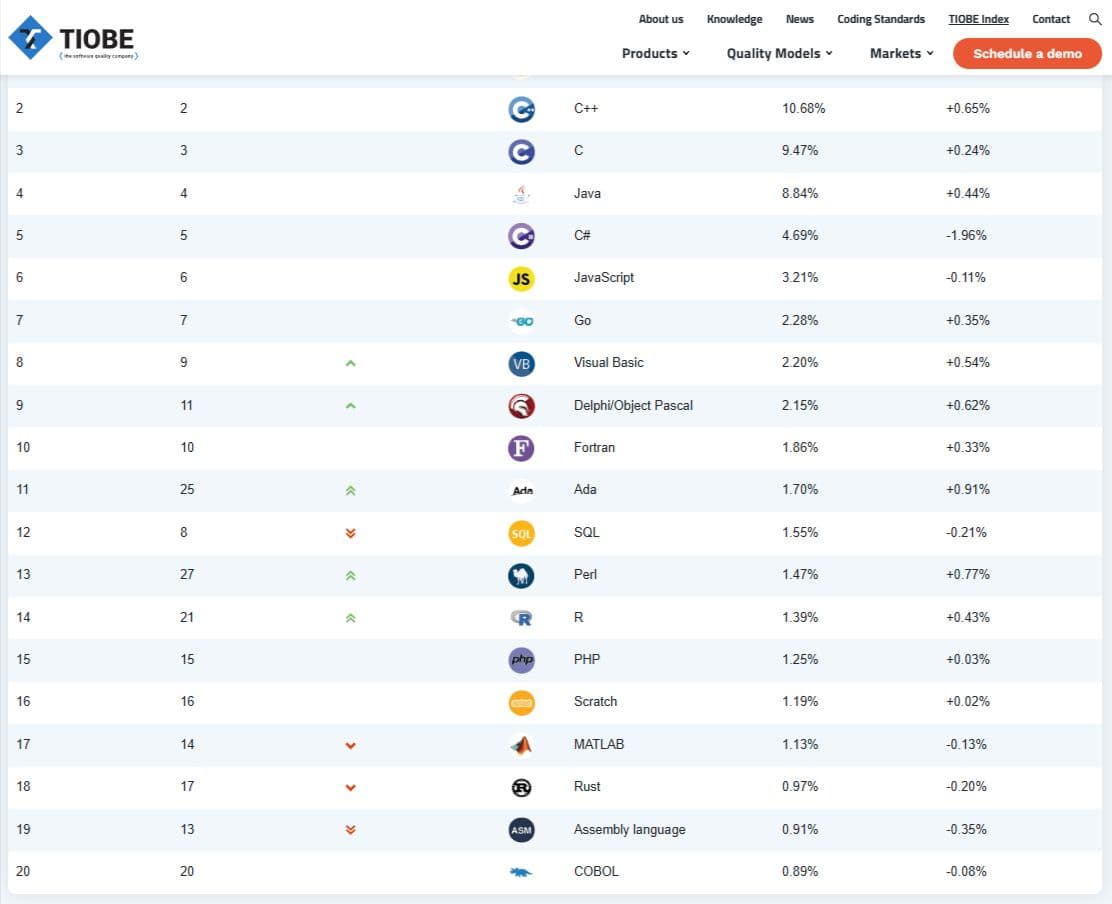
As new projects replace legacy projects, developers are choosing alternatives and PHP is losing market share. This trend is illustrated in this report from TIOBE below.
Update - 6/15/25
When we wrote this article in February of 2024, PHP was ranked #8. As of June 2025, PHP has fallen to the #15.
Acknowledging the broader trends, it's clear that the landscape of new application development is diverse, with PHP occupying a specific, though not dominant, niche. If developers continue migrating to alternative languages, it could become a problem for CMSs like WordPress and Drupal.
For years, WordPress plugins have allowed low-code builders to add design and functionality to websites without the need to involve developers. This is a big plus because involving developers significantly increases project cost and timelines.
But these plugins come with a cost.
Most importantly, plugins negatively impact performance. As you add more plugins, your site's load time will increase. This can get pretty egregious and it's not uncommon to see feature-heavy WordPress sites that take more than 5 seconds to load.
A fresh installation of WordPress doesn’t do much. Listed below are some very basic features that any serious CMS should have. WordPress doesn't have them and this forces users to add plugins.
You can't add custom content types or custom fields.
You can't export content to a CSV file
You can't add and edit the columns of content views in the admin UI. This also rules out a lot of content sorting options.
In WordPress, these basic features are handled by plugins, and the most popular plugins for these features have paid versions. I find that most projects require the paid versions of these plugins.
Sanity, Payload CMS, Contentful, Webflow, and Wix all include these features out-of-the-box.
A good developer with experience building WordPress sites can build a performant site with fast load times. However, that same developer can make a site that loads even faster using a modern CMS.
I ran some Pingdom tests for a number of different websites and here are the approximate average loads times.
Webflow: 600ms
Drupal: 950ms
Strapi and Next.js: 350ms
I ran this test for multiple WordPress sites, and to be fair, I looked for prominent WordPress developers in the Kansas City area. Most of the load times ranged from 1.5 seconds to 2.5 seconds. The one exception was a site which had a 650ms load time. Impressive. It would be fair to say that other content management system load twice as fast as WordPress.
This is an area where WordPress's heavy dependence on plugins causes problems. The more plugins you add to your site, the slower your site will load. Because WordPress doesn't do much out of the box, you're going to need plugins.
Drupal, Webflow and Next.js (which covers most headless CMSs) all have caching and/or build optimizations as part of the core product. WordPress doesn't include this in their core project. You'll have to install a plugin. The top option for this is WP Rocket, which cost $59 to $299 per year.
A content management system's purpose is to help manage content. At a basic level, it provides users with a friendly interface to create content, store content, establish content workflows, and control access to content. From a more technical perspective, a CMS creates the data model for an application. Content types are tables. Fields are table columns, and reference fields represent relationships between tables. These are the areas where a CMS needs to excel. If extra features are offered, great, but not at the expense of the core purpose of the CMS.
The headless CMS architecture highlights the core scope of a CMS. The CMS doesn't provide any functionality to the front end. It returns JSON data that allows a separate front-end application to create the user experience.
This approach to content management puts a spotlight on WordPress's flaws and shortcomings. If a headless architecture relieves the CMS of its frontend support, it needs to excel at content management and creating the data model.
This is WordPress's worst quality, which makes it a poor choice for a headless website.
WordPress requires the ACF plugin to create custom content types and create custom fields. And if you want to create relationships between those fields, you'll need to pay for the ACF Pro version. WordPress can support a headless frontend, but other CMSs offer better out-of-the-box content type support, and developers are making the switch.
Depending on which source you look at, WordPress is responsible for 70% - 90% of hacked websites. WordPress's market share is at ~45% so the software is responsible for an outsized majority of hacks.
WordPress advocates often blame WordPress admins for not following security protocols. Some of these protocols include:
Always keeping WordPress core updated.
Keep plugins updated.
Keep your themes updated.
Don't mess up your file permissions.
Use a reputable host. Improperly configured hosting servers can lead to exploits.
Don't install faulty themes or plugins.
Use a really strong password.
The problem with this is that WordPress is marketed as a solution that is appropriate for novices because it's "easy to use." Less experienced users may not have a good feel for which plugins and themes are problematic. They will probably be some gaps in their core and plugin update routine. Your average WordPress user will not reliably follow all of those protocols.
You can claim WordPress is "easy to maintain" or you can tout the software's security, but you can't do both. Keeping WordPress secure requires some concerted effort and knowledge of the software's ecosystem.
Good security means dealing with the reality of your users' knowledge and capabilities. Blaming "lazy admins" for security breaches is how you end up with 80% share of hacked websites. Hacked websites aren't going to persuade users to delve into the nuance of WordPress security. Users are just going to move to Squarespace, Webflow, and other competitors that are both more secure and easier to maintain.
If WordPress is dying, then other platforms must be growing. Below are the CMSs that present the biggest threat WordPress.
Ideal for budget-conscious companies with limited design and development resources, these no-code builders simplify website creation. They don’t require users to worry about selecting the right host and updating the core software and plugins. Hosted by the companies themselves, these CMS platforms eliminate the need for users to select hosting services or update core software and plugins, making them easier to maintain and more secure. They also include SEO configuration options for small businesses and generally load faster than WordPress, making them superior choices for companies needing basic websites.
For companies that want more flexibility than Wix and Squarespace, Webflow is a good candidate. It allows for more innovative designs and complex site structures than the aforementioned no-code builders. The software has a similar no-code user-interface, but with more intricate configuration options. Webflow mimics standard web development but provides a user interface instead of requiring direct code editing. Webflow also includes a component feature that makes it easy to reuse common website elements.
Compared to WordPress, Webflow offers many default features that would require plugins when using WordPress. These features include:
Creating custom content types
Creating custom fields
Creating list views of custom content types
Exporting your content as a CSV file
Like other no-code builders, Webflow hosts all the websites on their platform, and this provides better security - especially for less experienced developers. Some claim that Webflow is only for “basic websites” and can't support complex features—but that hasn’t been my experience. I think this is coming from users who only have a superficial understanding of the platform. I’m constantly surprised by the things you can do in Webflow once you learn the system.
For companies that want more control and flexibility than Webflow offers, these modern, headless CMSs are compelling options. They offer developers the freedom to build what they want while making content easily accessible through APIs. This flexibility allows developers to build structured content systems and deliver them to any channel or device.
These headless CMSs require more technical skill to develop than WordPress, but they also offer a number of advantages, including:
Extremely fast load times as low as 300ms
Because these CMSs only output JSON through an API, there is a much lower chance your site will be hacked.
These CMSs are built using TypeScript/JavaScript, which is increasingly the more preferred language for developers.
Easily use whatever frontend technology you want (Vue.js, Next.js)
Power multiple websites and applications from a single CMS instance through APIs.
The evolving CMS landscape highlights a move towards user-friendliness, security, and adaptability. As WordPress grapples with these modern demands, alternatives like Squarespace, Wix, Weebly, Webflow, and headless CMSs such as Strapi, Contentful, Payload CMS, and Sanity gain ground. These platforms serve varied needs, from small businesses seeking simple, maintenance-free websites to enterprises needing advanced, scalable solutions. Each offers unique benefits that may outweigh WordPress for specific projects. This shift suggests a future where the choice of CMS is driven by the need for ease of use and technological flexibility.
While WordPress has undoubtedly left an indelible mark on the digital landscape, its future hangs in the balance amid evolving web technologies and shifting developer preferences. The platform's challenges—ranging from security vulnerabilities to its reliance on plugins and shortcomings as a headless CMS—underscore the pressing need for transformative change. As the web development community continues to explore and embrace more modern, efficient, and secure alternatives, WordPress must innovate or risk a gradual decline in relevance.
The next few years will be critical in determining whether WordPress can adapt to the demands of the contemporary internet or if it will slowly lose relevance.
Demand Stack, All Rights Reserved 2025